Initiating a Rescue
Steps to take after determining a hiker needs emergency evacuation:
- Secure the scene- move hiker away from immediate danger such as rockfall or swift water.
- Be sure you have taken the emergent steps to provide first aid as described in Resources, depending on the situation.
- Attempt to call 911 using cell phone. (Note: many modern smartphones such as iPhone 14 and beyond, can connect to low-earth orbit (LEO) satellites for emergency and messaging use when you are completely out of range of traditional cell towers. Be familiar with your cell phone’s capabilities).
- Also trigger SOS with satellite communicator if someone has one (Garmin inReach devices, Zoleo, SPOT) or use T-satellite if you have it.
- Cell phones with satellite capability and satellite communicators will transmit GPS coordinates for your location when SOS is triggered. Be prepared to communicate specifics of the situation via cell text or satellite communicator text.
- A useful phone App that provides location information is “What3Words.” Opening the App displays 3 words that correspond to your specific GPS location, which you can relay to responders. Cell or internet service is not required to use this App.
- Do not change position unless EMS advise you to.
- Keep hiker stabilized.
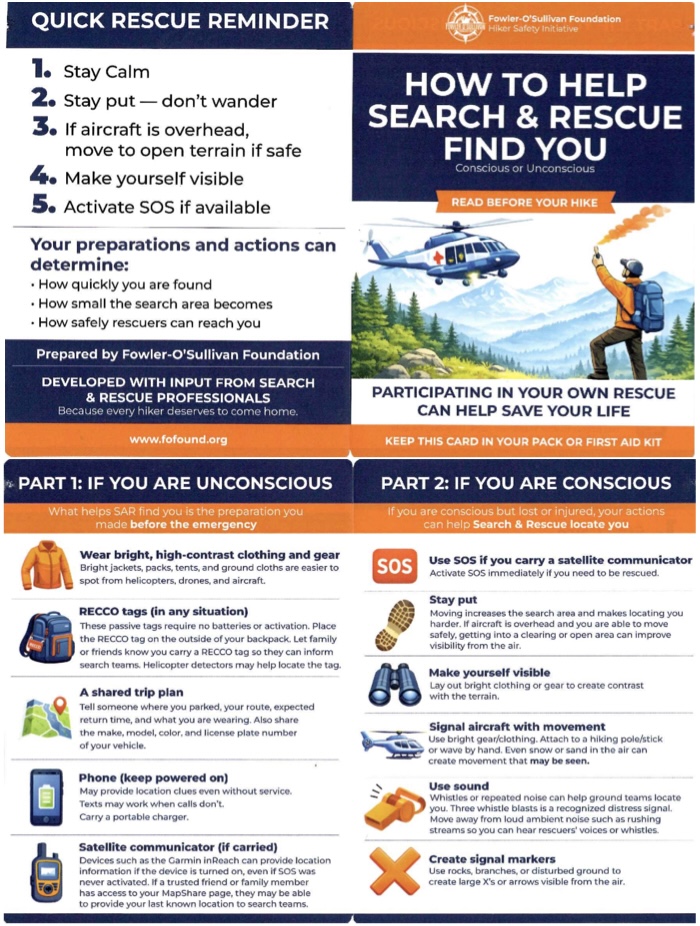
- Create high-visibility conditions- bright clothes, clothes attached to hiking poles, waving, rocks and branches to create large ‘X’.
- Universal Distress signals:
- Whistle: Blow your whistle 3 short blasts, pause for 1 minute, and repeat.
- Signal Mirror: Flash sunlight or a flashlight beam toward potential rescuers or overhead aircraft.
- After SOS triggered and hiker stabilized as much as possible, determine with Sweep how many people may need to stay on-site to help, and how many to hike out back to trailhead (do not put other members of hiking group in danger).
See below for Important Quick Rescue Reminder From the Fowler-O’Sullivan Foundation- Hiker Safety Initiative